UA-208572229-1 G-XLJDE19NX2santus Andor

Google Cloud Platform: Read This Now Because of Your Business

google_cloud_platform

Suppose you have an online business and looking for the best solution for you. In that situation, the Google cloud platform is one of the most significant platforms. It has a high demand for your enterprise. 

If you are among firms that feel their workload is increasing day by day, who are also searching for the best and secure storage room, then you are at the exact location. read more

How to share your modem internet on one laptop with the other via wi-fi

modem internet

(adsbygoogle = window.adsbygoogle || []).push({});

Are you looking for a way to share your modem internet used on one pc or laptop with another?

Maybe you subscribed for data on a dongle which you use with your laptop and wish to share with a friend, family member or even a customer on his/her own computer via wi-fi.

Sharing the modem internet between systems will help you to save cost in the face of the current economic downturn as many people and organisations look inwards finding ways of minimizing cost. In this case you are using one stone to kill two birds.

Perhaps it as well very important to mention here that this sharing does not just involve modem internet alone but the process also shares files between the computers involved.

Just imagine yourself picking a file from a given folder of another computer placed in the bedroom while you are at the sitting room working with your laptop without standing up . Fun isn’t it? Good.

If that is quite important to you, then you are in the right page where solution is provided for you as you read on.

For two different computers to communicate via Wi-Fi, you will need to carry out a few clicks and minor configurations on the systems concerned.

Did I hear you say you are not a technical person? Never worry, this does not require technical expertise knowledge to get through.

All you need are the systems and the ability to navigate through a windows computer and you are good to go. No need for cat5, cat6 or any other network cable crimping and termination as the process is based on Wi-Fi technology at this time.

(adsbygoogle = window.adsbygoogle || []).push({});

To achieve, that follow the steps below:

  1. Turn on both laptops.
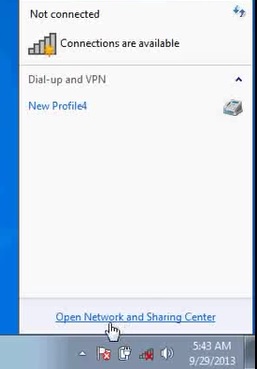
  2. Click on Open Network and Sharing Center at the right hand side of your windows  task bar

file sharing

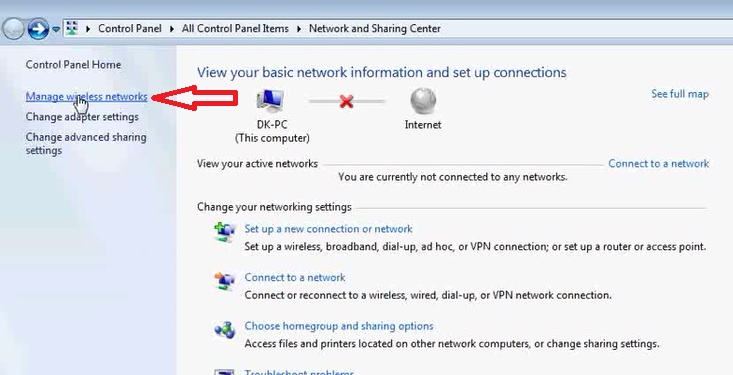
  1. Click on Change Advance Sharing Settings at the top left corner of the screen.

(adsbygoogle = window.adsbygoogle || []).push({});
internet sharing

  • Select Turn On Network Discovery , Turn On File and Printer Sharing and Turn On Sharing So Anyone with Network Access can Read and Write Files in the Public Folders
  • read more

    5 Easy Steps to Create Whatsapp Group

    whatsapp group

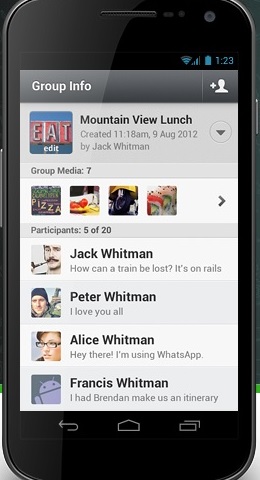
    Whatsapp is a powerful cross-platform messaging application that allows you to exchange messages within and across networks irrespective of your location and using whatsapp group is easier to reach users at ones.

    Whatsapp has revolutionized instant messaging concept. It has the ability to enable users to share images, videos and even allow free calls within the application network.

    This suggests that you can make free calls from your whatsapp application to another user of whatsapp on another number with paying for it.

    (adsbygoogle = window.adsbygoogle || []).push({});

    As well, organizing users in groups ease the communication process.

    Using a group enables you to chat with up to 256 users at the same time in a group.

    Many organisations high and low, clubs, associations, institutions etc are now leveraging the group feature to hold virtual meetings, conferences, and interactions.

    I know of a very prominent transport company in Nigeria that uses whatsapp group to share live information about their transport operations and updates.

    Their information sharing on the group cuts across areas like bus departure time, routes, road safety information, bus break down notification, rescue request, arrival notification, etc.

    Individuals as well connect with friends and families to interact. Indeed having them in a single group is such a great feature of whatsapp application.

    As at February 2016, Whatsapp was said to hit 1 billion subscribers. Today, there may have increased tremendously.

    All over the world, people are beginning to realize the awesome advantages of whatsapp as an application.

    Steps to Create  Whatsapp Group

    Also, note that for you to create a group, you must have registered and had an account with whatsapp. Registration is easy and free.

    (adsbygoogle = window.adsbygoogle || []).push({});

    Download whatsapp

    See Why Your Whatsapp Group may Be At Risk
    How to Easily Activate Whatsapp Dark mode on Your Device
    Activate Instagram Dark Mode On Your Phone Now

    First, you download the application on your phone, then type in your phone number and other relevant personal information.

    After that you verify your phone number and that’s done.

    To create a group

  • Open WhatsApp, locate the Chats screen.
  • By the top right-hand side of the  Chats screen, you will see the New Group button, click on it.
  • Enter a group  subject or title.  This forms the title or group name that participants will see even during your invite.
  • Add individual participants to the group by selecting (+) sign, or by typing the name of the contact.
  • Tap Create to finish creating your new group.
  • read more

    MTN Subscription Service

    mtn

    (adsbygoogle = window.adsbygoogle || []).push({});

    Mobile Telecommunications Network, MTN is a South African based GSM(Global System for Mobile) communications . It was formerly called M-Cell in South Africa.

    As at March 2016,  MTN Nigeria had a subscriber base of almost 60 million.

    Below are some very vital information to its subscribers:

    247 Customer care toll free line (from an MTN line)            Dial 180

    247 Customer Care line from other networks                       +23480310180

    247 Customer care line from Outside Nigeria                       +23480310181

    (adsbygoogle = window.adsbygoogle || []).push({});

    Blackberry Service Info:

    To subscribe for MTN BIS , text BIS to 21600

    BIS allows you to activate and run up 10 different email addresses at a time and goes for N1500 per month.

    BBC allows you only one email. BBC subscription goes for N1000.

    To subscribe for BBC, Text BBC to 21600

    There are other MTN Blackberry plans as can be seen below:

    BB Plan          Data Capacity          Validity      Price   Activate read more

    How to block websites on your computer

    block websites

    (adsbygoogle = window.adsbygoogle || []).push({});

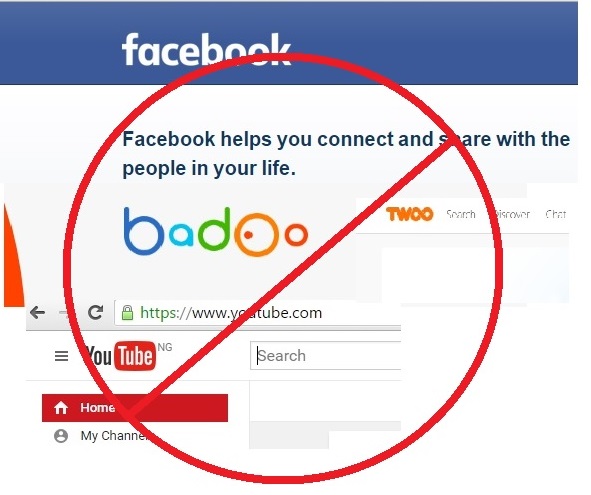
    Do you have challenges controlling who browses or downloads what on your windows pc and want to block websites you do not want them to access on your computer? You may wish to block sites like youtube, facebook, badoo, twoo,twitter etc. Then search no further as we are here to show you the very simple steps to achieve that.

    The importance of internet to mankind can never be over emphasized. It facilitates and affects almost all spheres of human life.

    Individuals and companies spend huge funds on internet services; however, there is serious abuse of available internet data.

    With the current trend of social media platforms  and blogging where people easily connect with friends, fans, colleagues and get involved in video streaming and downloading, images, gaming etc, there is the need to block websites that are not necessarily needed.

    Besides, at times it may be necessary to  as well block a website to avoid privacy violations, prevent access to adult content or simply to avoid net loafing that gives rise data wastage.

    To block websites on your windows computer, it is quite easy. You do not need to be techy before you can do that.

    In this article we will teach you how to on your own block certain websites from opening on your browsers.

    (adsbygoogle = window.adsbygoogle || []).push({});

    (adsbygoogle = window.adsbygoogle || []).push({});

    If you are ready, then we are set lets go .

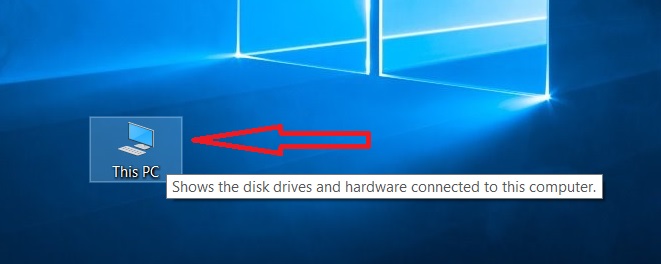
    1. First open your Computer


    block website

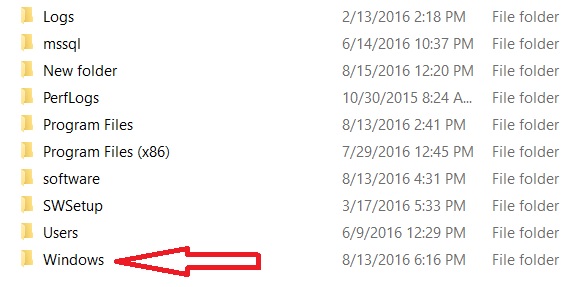
    After opening Computer, Look for C: drive or any drive that may have your windows installed ( in this case I want to assume that it was installed on C:/.

    2. Open  C: drive and Open Windows Folder as seen in the image below:

    Locate  and open System 32 Folder  on the list of folders under windows.

    block websites

    See image below:

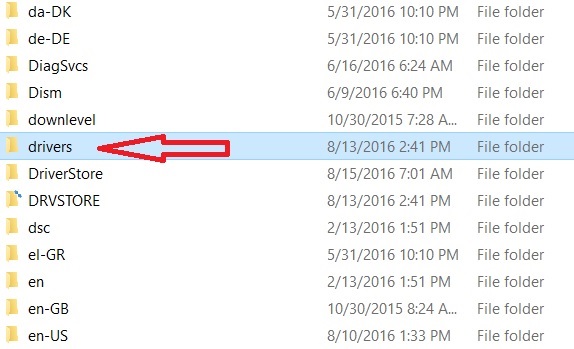
    3. Proceed to open Drivers folder

    block websites

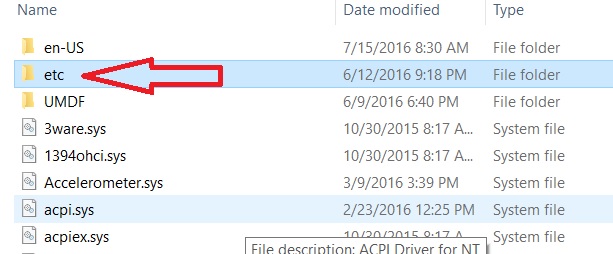
    4. Having opened the Drivers folder, go ahead to locate and open etc folder

    block websites

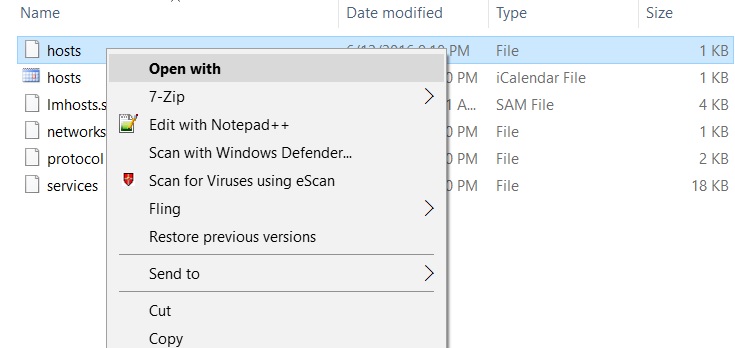
    5. Locate and right click on the host file that is a text file as seen in the picture below and choose either notepad or Open With to enable you select notepad.

    block websites

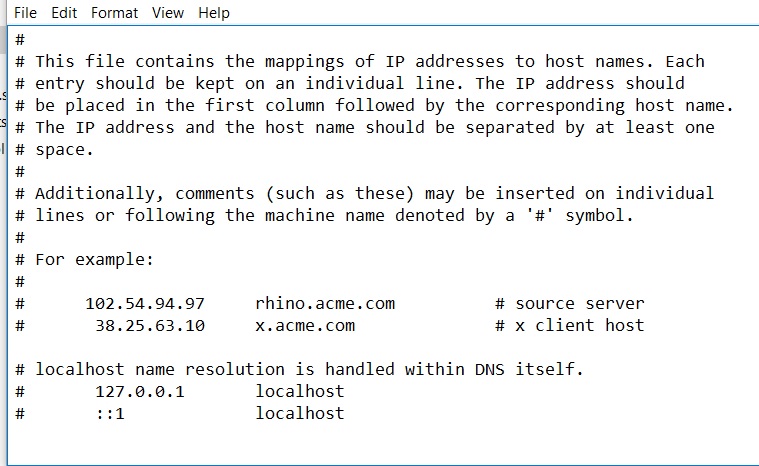
    After opening with notepad, you will see the text document with codes as can be found in the image below

    block websites

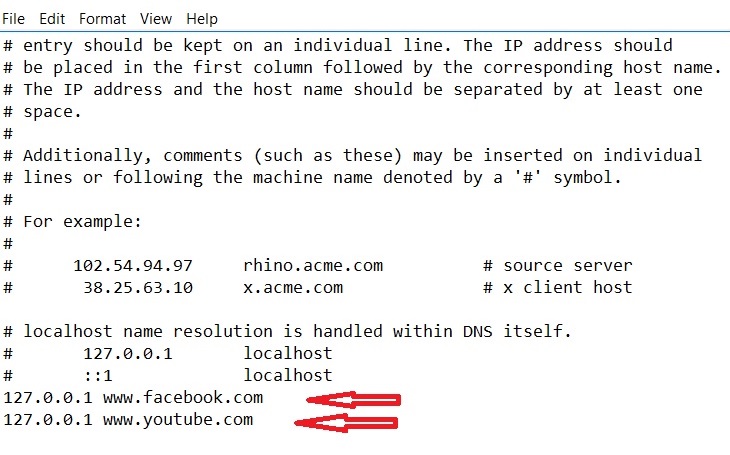
    6. You will locate the last line of the code, and type your own code. Let’s say I want to  block youtube.com and facebook.com, I will type the loopback  address of the network card of the computer which is by default 127.0.0.1 followed by a space and then type the url of the site you want to block.
    E.g  127.0.0.1 www.youtube.com.

    Type the URLs you wish to blcok as follows


    Having done that, Click on Save. Then go to  open your browsers,type any of the urls blocked and you will see that the site cannot open.

    One more thing lest I forget, sometimes certain antivirus programs do not allow  you to update host file without restrictions, in that case you may  need to disable the antivirus so the host file can save.

    For systems running microsoft essentials, follow the same step above to disable should it restrict updating of host file

    We do hope this article was helpful.

    Should I buy Laptop or Desktop Computer in this year 2018?

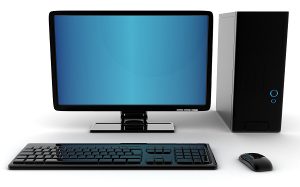
    laptopLaptop computers are small computers that are portable enough to be carried on laps during use.

    (adsbygoogle = window.adsbygoogle || []).push({});

    Their screen sizes range between 9”, 10” 11” down to 20 plus inches.

    There are several reasons you may want to go with laptop computers instead of desktops.

    Advantages of a  Laptop to a Desktop

    1. Portability

    One of the most powerful merits of a laptop computer is portability. You can  afford to pick and drop it in the boot of your car  or just in your bag and rush down for a seminar presentation, board meeting, training session or any event that needs the use of a computer with less hassle.

    But desktop computer on the other hand is bulky and has many peripheral parts you must carry to have a complete computer system to work with.

    Besides, you could just place the device on your laps in case there is no table space unlike the desktop which you must make a table space for.

    Desktop Computer
    Desktop Computer
    1. Electricity Backup

    (adsbygoogle = window.adsbygoogle || []).push({});

    All laptop computers come with batteries that last for sizeable number of hours. This enables you continue your work in case of sudden power outage. While desktop computers have no batteries but depend on external power backup sources such as Uninterruptible Power Supply (UPS), inverter etc. which are expensive to purchase and even maintain. You wouldn’t want your work to be disrupted due to power failure hence the need to go for a laptop instead.

    1. Extra features

    Laptops often are designed with some extra features to enhance user experience for example Bluetooth, webcam, wi-fi, etc.

    Desktops on the other hand will have to require that you purchase the said devices and install separately which is most times challenging in terms of cost and time.

    Read Also:  

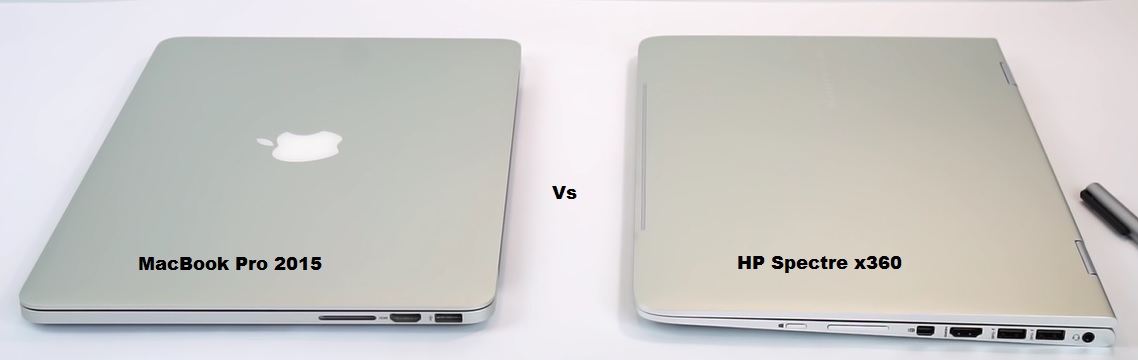
    Retina MacBook Pro 2015 vs HP Spectre x360


    1. Superior Screen Display

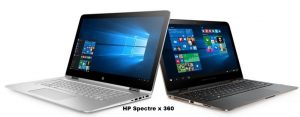
    Laptop screen technology offer more appealing graphic display to enable one enjoy pictures, video games and movies quality compared to desktop screens. A laptop series such HP Spectre x360 has sophisticated screen display power that will allow users enjoy compared to desktop of the same time and configuration.

    1. Easy Keyboard Arrangement

    (adsbygoogle = window.adsbygoogle || []).push({});

    Its keyboard is arranged in such a way that keys are easily accessed and located even by beginners. But because of the large space on desktop keyboards, often times beginners have to wander covering long distances to locate some keys during use.

    1. Greater Resale Value

    Laptops have higher resale values compared to desktops. After years of usage, you will be sure of still parting with your laptop device at a reasonable amount. But desktop computers go for much less and buyers tend to underrate and under prize them.

    1. Environmental Friendliness

    Laptops generate lesser ewaste compared to desktops computers. For quite some years now organisations and individuals have invested much on protecting the environment.

    Technologies recognize this fact hence reduce number  and size of components that come with laptop products.

    While desktop computers still come with numerous and size able components that later cause serious environmental ewastes.

    1. Saves Energy

    Laptop consumes less energy compared to desktop systems.

    While it consumes as little as between 15 to 25 watts, desktops guzzle as high as 150watts. Therefore, if you want a computer with lesser energy requirement, laptop may just be the solution.

    1. Prizing

    (adsbygoogle = window.adsbygoogle || []).push({});

    Years back, computer users were scared away from laptop systems due to exorbitant  costs. Then laptops were so expensive to the extent the prize of one average one could buy two desktops.

    But with time, manufacturers and vendors understood this challenge and worked to reduce laptop cost. In recent years, the prizes have over time crashed giving desktops tremendous sales challenge.

    As it is right now, most its models are way cheaper than desktops.

    So now that you are well informed, the choice is in your hands to make betweenthe two.

    Retina MacBook Pro 2015 vs HP Spectre x360 2018

    (adsbygoogle = window.adsbygoogle || []).push({});

    macbook
    Due to popular request to make some comparison between two powerful, elegant and advance MacBook Pro 2015 and HP Spectre x360 laptops by our fans and followers, we have decided to embark on the review and comparison exercise.

    (adsbygoogle = window.adsbygoogle || []).push({});

    Perhaps, one of the major steps in wanting to acquire any of such devices after making some savings towards it is to ensure you have the right information as a guide to avoid regrets after purchase.

    Both laptops are great devices with excellent speed, design, configuration and awesome finishing.

    As mentioned we are reviewing 13’’ Retina MacBook 2015 Pro which is  among the coolest boxes ever designed by Apple. While on the other hand we have HP Specter x360, one of the most awesome windows ultra-boxes designed by HP.

    Now here are the two great eye-catching machines with tremendous capabilities and stand out uniquely in the world of laptops with both of them been part of the latest generation.

    Both devices look elegant and stylishly polished with superb esthetics that makes one wish to own any of them.

    Both of these guys have about the same size, 13’’ display, similar in weight as well. Both are available in core i-5 and core i-7 CPU capacities.

    FEATURES

    Retina MacBook Pro 2015

    macbook

    (adsbygoogle = window.adsbygoogle || []).push({});

    The following are the major features

    2.9 13-Inch Intel Core I-5 Processor(5287U)

    512 GB Of 4 Lane Pcie-Based Flash Storage

    8 GB Of Onboard 1866 Mhz LPDDR3 SDRAM

    Dual Cores On Single Silicon Chips

    3MB Shared Level 3Cache

    Integrated Intel Iris Graphics 6100 Graphics Processor Which Shares System Memory

    720p Facetime HD Webcam

    High-Resolution LED-Backlit 13.3″ Widescreen 2560×1600 (227 Ppi) “Retina” Display

    No Internal Optical Drive

    802.11ac Wi-Fi

    Bluetooth 4.0

    Two USB 3.0 Ports

    Two “Thunderbolt 2” Ports

    An Audio In/Out Port

    An HDMI Port

    Haptic-Capable “Force Touch” Trackpad

    Backlit Keyboard

    An SDXC Card Slot

    And Comes With

    It is a Laptop

    Non Screen touch

    Battery Of About 10 To 12 Hours Of Battery Life

    OS- Mac

    READ ALSO: See Free Tech Support Software That Can Help Your Business Grow Fast 

    (adsbygoogle = window.adsbygoogle || []).push({});

    HP Spectre x 360

    macbook

    13.3-inch 1,920 x 1,080 touchscreen

    CPU       2.2GHz Intel Core i5-5200U

    8GB DDR3 SDRAM 1,600MHz

    3,839MB (shared) Intel HD Graphics 5500

    256GB SSD

    Optical drive       None

    Screen Touch

    Digital pen

    An Audio In/Out Port

    Two USB 3.0 Ports

    Convertible hybrid Two-in-One(it is both a laptop and a tablet)

    802.11ac wireless, Bluetooth 4.0

    Operating system             Windows 8.1 (64-bit)

    So for those of you who have maximum computing needs you can go for Retina MacBook Pro because of its processor power/capacity.

    Meanwhile, HP Spectre gives you the productivity, versatility and multipurpose usage as it could be used as both laptop and tablets with digital pen as well to take notes.

    On the whole, both devices are simply excellent and are worth investing on.

    The first major and Latest Windows 10 Updates

    windows 10

    (adsbygoogle = window.adsbygoogle || []).push({});

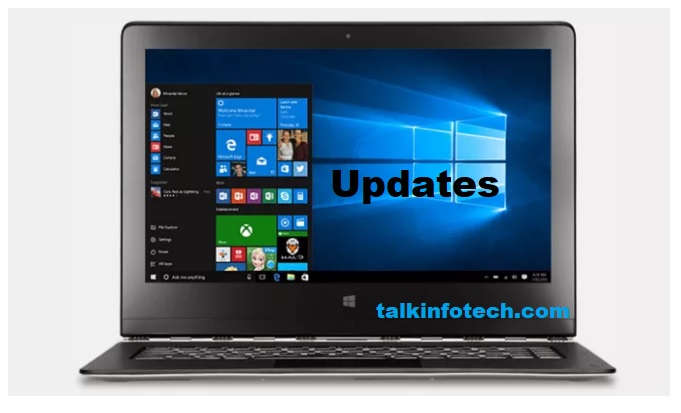
    Windows 10 Updates

    Microsoft Corporation, the owners of Microsoft Windows Operating System for some months now has being testing the first major update for her latest windows 10 operating system.Windows  fans will be glad to see this happen and happen quick as over 110 million machines are said to be running the windows 10 operating system already.

    Like every other great project well delivered, Windows 10 came with its own teething issues to be addressed such as
    a new coloured title bar for desktop software. All software will now feel a lot alike and more blended as
    the ones designed originally for windows 10.
    Also, the corporation has enhanced the context menus all around the Windows 10 operating system to ensure they appear a bit bigger and more shadier to match the theme. read more

    Secure Your WordPress Website From Hackers

    hackers

    (adsbygoogle = window.adsbygoogle || []).push({});

    Hackers are capable of anything when talking about the safety of websites online  especially wordpress sites.

    Part of the challenges of having websites online like wordpress site  is due to the  activities of hackers.

    Hackers are capable of so many terrible things on the internet.

    Like the pirates in the sea, highway robbers etc., the aim of hackers is always to compromise information in online resources.

    Hackers

    Hackers are people who are always out to find and exploit weaknesses on computers or computer networks.

    There are different reason why hacking is often done, its either to make profit, challenge the expertise of someone, enjoy it as a game or even protecting something they feel is not pleasant to them.

    There are two major types of hacking, ethical and unethical hacking.

    Ethical Hacking

    This involves hacking activity that is legal and permissive. For instance, if an operating system password can no longer be remembered yet the owner of the computer wants the password removed. If someone breaks into the computer with his or her permission to help out, it is referred to as ethical hacking.

    Ethical hackers normally require permission and authority to hack most times, they are commissioned or paid to carry out the hacking.

    Unethical Hacking

    Hackers under this category carry out illegal hacking without permission. Most times they do it to  earn  profit for themselves.

    Some of the hackers look at it as a game or a challenge with which they must win.

    Hackers do not respect the size of organization they intend  to hack. Big companies like Sony, Chick-fil-A, Anthem, Premera Blue Cross, U.S. Postal Service, MCX, Staples have all been hacked recently.

    Hackers also do not respect the technology or platform that was used to build the website only that some platforms are a bit easier for them to break through than others.

    WordPress

    WordPress is a powerful Content Management System (CMS) which has gained acceptance in recent years and has been able to power millions of websites  from small to mighty companies across the globe.

    At least report has it that wordpress powers not less than 22 percent of the entire website on the world wide web.

    It may interest you reading article to know if you haven’t before now that great companies sites like CNN, Forbes, Times Inc.,  ebay, MTV News Room, TechCrunch, The New Yorker, BBC America, The Official Star Wars Blog, Facebook News Room etc  are created with wordpress.

    However, like every other technology, wordpress sites are invaded by hackers periodically.

    (adsbygoogle = window.adsbygoogle || []).push({});

    Report has it that at least 76% of wordpress sites are vulnerable to hacking . Therefore there is the need to look for a way out of this problem.

    Talkinfotech.com has researched into providing tips on how to prevent such unethical hacking of websites especially sites designed on wordpress platform.

    Hackers can affect wordpress sites in the following ways:

    Hackers can replace your affiliate links

    Hackers can steal your traffic or redirect them to someone else

    Hackers can pilfer your personal data or those of your site visitors like credit cards, passwords, and so on by infecting the computers with malwares or inserting phishing pages to steal their data.

    Hackers will attack even if your website does not have much traffic.  Because for hackers everything website is a huge resource.

    Hackers do all these by publishing malicious scripts.

    But hey! Don’t worry in this article, I will show you how to protect your website from  such attacks and make the hackers scripts quit and go to easier targets.

    Steps:

    #1. Do not use  “Admin” as your user name

    By default the username of a wordpress website is “Admin”. This explains why there are several hacking scripts built  to hack wordpress sites through the username “Admin”.

    (adsbygoogle = window.adsbygoogle || []).push({});

    If your website’s username is “Admin” , go to the Dash Board, Users and create a new user with administrator privilege.

    Delete Admin username while doing that, select the option “Attribute all contents to:” the new username you just created.

    #2. Limit Login Attempts.

    By default wordpress allow users many attempted to login, that is bad for you but good for  hackers as they take advantage of a few attempts feedbacks to hack your site.

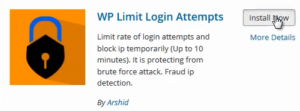
    To limit the login attempts, go to your Dash Board , Add New Plugins then search for wp limit login attempts.

    login attempt plugin

    Install and activate it, go to settings, Wp limit Plugin to set how many attempts you can allow.

    #3. Keep your website up to date

    Periodically, wordpress themes, plugins and related facilities are updated to address rising security and other challenges.

    Non-updated wordpress sites are vulnerable to threats from hackers.

    It is therefore advisable to update your website regularly. But remember to back-up your site before updating .

    #4. Delete the Readme.html file

    (adsbygoogle = window.adsbygoogle || []).push({});

    The ReadMe.html file  is located at the WordPress  directory that gives information about  wordpress version, PHP version, MYSQL version and other information that they need to hack your site.

    So, just go to your website root directory and delete the ReadMe.html file.

    #5. Backup-up your website regularly.

    Backing up your

    website read more

    How to hide your Date of Birth on Facebook in this 2020

    facebook

    During account signup on Facebook, date of birth is one of the information required on the online form been filled.

    And by default, Facebook displays date of birth automatically just the way name and other information are shown.

    Reason being that Facebook thinks it doesn’t matter to people if their dates of birth are shown to the world on their profiles.

    Little does Facebook know that for different personal reasons, most people prefer to keep their ages , date of birth and other private information secret.

    READ ALSO See The Magic Web Based Tech Support Can Do To Your Business

    It is sometimes inappropriate for such personal details to be displayed to the world without verifying from the owner of the details.

    On the other hand, several Facebook account owners in most cases do not even know that such details are been viewed by their profile visitors.

    An incident happened a couple of years back when a friend complained that she receive strange calls. But after investigations, she realized they got her number from her Facebook profile.

    Of course, up till now most Facebook profiles still have profile owner’s phone numbers displayed. What I can’t phantom is whether the said owners of the accounts are aware but intentionally allow them there.

    In any case, it is understandable for Facebook pages belonging to businesses or organisations as such phone numbers are meant to connect clients with the business owners.

    As for me, I wouldn’t want my personal details like phone number , email or even date of birth to be published on my profile to the full view of all visitors. I could choose only my friends or family to view them.

    Hide Your Age

    After logging in to your Facebook account, you will need to follow the steps below:

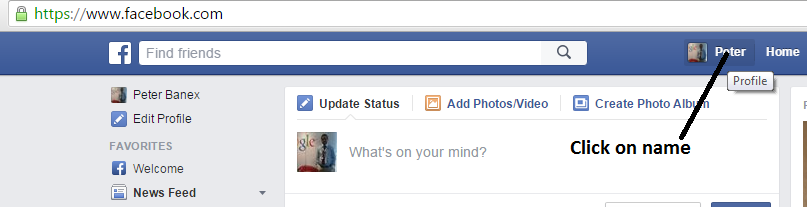
    Click on your name to enter your account profile.

    facebook

    Click on About tab to display your information and the settings tabs

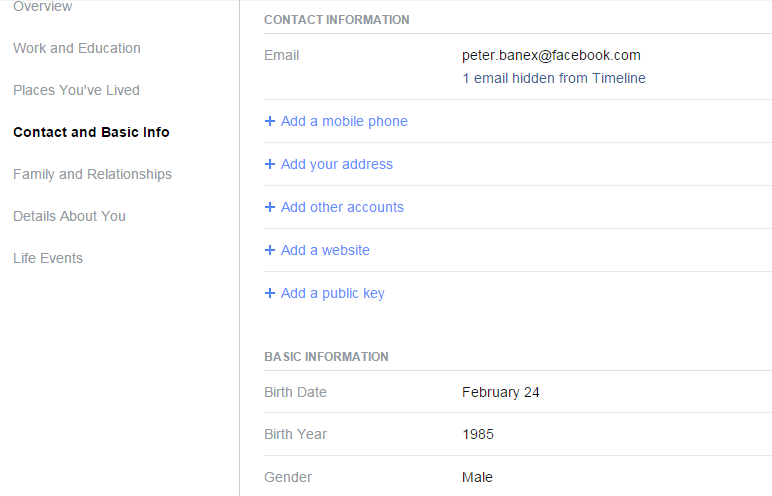
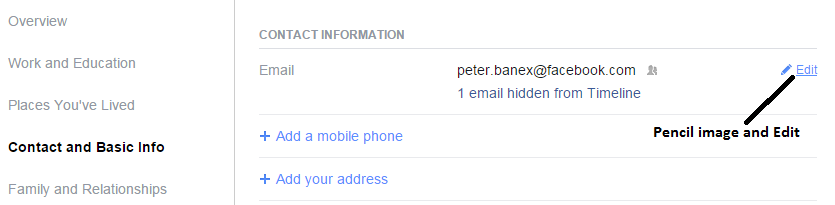
    At the left hand side of the page under Overview, Click on Contact and Basic Info

    Facebook Click on Contact and Basic Info

    Under Contact Information, take your mouse to the end of each field say Birth Date then  a pencil image and Edit will appear.

    facebook

    Click on Edit , a drop down menu will appear. Scroll down and Click on Only Me

    By selecting Only Me option, Facebook automatically restricts access of other viewers including preventing even your friends from seeing your date of birth.

    If you want every visitor to see the Date of Birth, select Public. But if you will prefer only your friends’ friends then select Friends of Friends option.

    Repeat same process for Birth Year, Email, Gender and the rest of others  if you so wish to hide them from public view.